Joined-up Marketing
The Foundations of Successful Email Marketing
Email marketing is one of the fastest and most effective ways of reaching your customers. But in an age when our inboxes are constantly flooded with messages, you need to make sure that yours are getting through.
If you’re new to email marketing, or just want to make sure you’re covering the essentials, we’ve pulled together a guide of what to check for on your next email campaign.
1. Create subject lines that improve open rates
Your subject line should be around 10 words (or 60-70 characters) to have maximum readability and to increase your open rates. Test the use of personalisation in the subject – you may find it makes a difference, but make sure the data you’re using is up to date and correct.
2. Use a clear call to action that drives clicks
Don’t hide what you want the customer or prospect to do. Whether it’s ‘click here for your brochure’ or ‘visit our site to see our range of shoes’, make it obvious and easy to find.
Where possible, focus on a single primary call to action. Too many options can create confusion and reduce response rates. Make buttons stand out visually and use action-oriented language such as “Download the guide”, “Book your place” or “Shop the collection”.
Consider placing your primary call to action more than once in longer emails to ensure recipients can act whenever they’re ready.
Great copy is one thing, but generating a response is what matters.
3. Optimise your emails for mobile devices
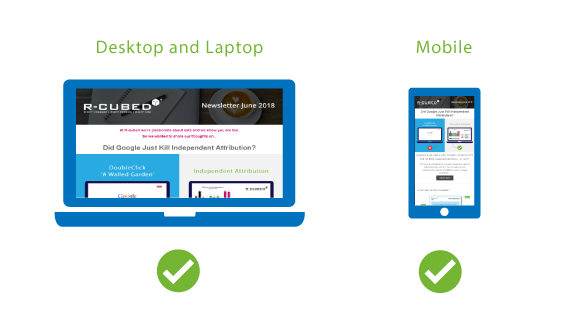
95% of people read their emails on a mobile device. So if your email only displays well on a laptop, you’re alienating a huge part of your audience.
Makes sure that your email renders well across all devices.
Mobile optimisation goes beyond responsive templates. Use short paragraphs, larger fonts and buttons that are easy to tap with a thumb. Keep important messages near the top of the email, as mobile users are less likely to scroll extensively.
Test how your emails appear in different inboxes, including Outlook, Gmail and Apple Mail.
4. Test email content to improve performance
Don’t just stuff your email full of messages and hope for the best. Test to see what content performs best.
A/B testing is one of the most effective ways to improve campaign performance. Test one element at a time, such as subject lines, imagery, calls to action or send times. This allows you to clearly identify what influences engagement.
Small improvements made consistently can have a significant impact over time.
What is getting the most clicks? What are people most interested in?
And take notice of any spam warnings. If your emails are getting caught up in spam filters, stop and make changes.
5. Use dynamic content for email personalisation
Change the content of your emails based on your customers’ behaviour, preferences and characteristics. It might sound obvious, but don’t promote your new garden furniture range to people who live in flats.
Tailor the content to what you know about the person and make each email relevant.
Personalisation should go beyond inserting a first name into an email. Use customer purchase history, browsing behaviour, location and engagement data to deliver content that is genuinely relevant.
The more closely your content aligns with customer interests, the more likely they are to engage with your emails.
6. Build consistent email templates that convert
A good template will not only give you a consistent, effective structure in which to create your emails, it will also ensure that you have included all the essential elements.
Templates also help improve efficiency by reducing the time needed to create campaigns. By establishing reusable components such as headers, product blocks and calls to action, you can maintain brand consistency while speeding up production.
A well-designed template should balance visual appeal with accessibility and usability.
Be consistent in your positioning of your company logo, branding, fonts and remember to include an unsubscribe link and company details, as they are legally required.
Test different layouts to see what works, and rollout the most successful across all of your emails.
7. Why every email needs a plain text version
Once you’ve created your html email, you’ll need to create a plain text version.
Although most people won’t see this, some devices or those with high security settings may block your email as spam.
Plain text emails can also help improve deliverability because some spam filters expect them to accompany HTML versions. They can provide a better experience for users with accessibility requirements or those viewing emails in highly secure corporate environments.
Even if most customers never see it, your plain text version deserves careful review.
So make sure you have a version that will get through to these customers. Many ESPs provide a button which will automatically create this based on your html version.
8. Make unsubscribing simple and compliant
Make sure that all of your emails have a clear and easy to use unsubscribe option. It’s not only good customer service, it’s essential if you’re going to stay on the right side of data protection laws.
Businesses sometimes worry about losing subscribers, but maintaining an engaged audience is more valuable than retaining contacts who no longer wish to hear from you. High unsubscribe rates can provide useful feedback about content relevance, email frequency or audience targeting.
Consider offering preference centres that allow subscribers to change the types of communications they receive rather than opting out completely.
Don’t be afraid of unsubscribes – they’re saving you time and money by telling you that they’re not interested, and you’ll damage your brand if you make it difficult for people to unsubscribe. And if they can’t work out how to unsubscribe, they’ll mark you as spam.
9. Test and learn, proof every email before sending
Regularly send test messages to yourself when creating your email and once it is finished, send it to yourself as a live campaign in order to see it the way your customer will.
For example, online view and unsubscribe links will usually not function in a test message so you’ll want to see what these look like once it’s sent.
Include your colleagues and ask them to review and proofread it. Often they will spot things you have missed, no matter how many times you’ve checked it!
10. Schedule emails carefully to avoid costly mistakes
Once you’re happy with your email, delay your broadcast for at least 30 minutes to give yourself time to spot any mistakes and correct them. The most common time to spot an error is just after you’ve pressed the ‘send’ button!
Timing can have a significant impact on campaign performance. Analyse historical engagement data to identify when your audience is most likely to open and interact with your emails.
Scheduling your campaign in advance also provides time for final approvals and reduces the risk of last-minute errors.
Ready to take your email marketing to the next level?
If you think you’ve got the basics covered and are keen to learn more about how you can take your email marketing to the next level, have a look at our 5 tips for the advanced email marketer.